
Electronic medical records for Nigerian hospitals
The offline-first EMR built for Nigerian hospitals.
Keep registration, clinical records and billing moving through internet outages. Lumevia synchronises securely when connectivity returns.
- Care continues offline
- On registered facility devices
- One continuous record
- Across every patient visit
- Secure synchronisation
- When connectivity returns
One electronic medical record
One patient record, from reception to billing.
Each team works from the same electronic medical record. Registration, vitals, consultation, orders and billing stay connected across the patient journey, online or offline.
Receptionist writes: Registration & check-in
Reception
The patient is found by name, phone or facility number, or registered fresh. Check-in opens today's visit on the same record.
Record LHV-128 · today’s visit
1 of 5 desks
- RegistrationChecked in 08:14 · MRN LHV-128

Expand when your facility is ready.
Add pharmacy dispensing and full laboratory queue management on higher tiers, without changing the patient record your team already knows.
- Available on higher tiersPharmacy dispensing
- Connect prescriptions to a structured dispensing workspace when your facility moves to a higher tier.
- Available on higher tiersLaboratory queue management
- Add a full laboratory work queue on a higher tier; the pilot already keeps requests and results on the visit.
Inside Lumevia
Hospital workflows, connected in one calm workspace.
Explore the EMR views that connect reception, nursing, consultation, patient records and facility administration.
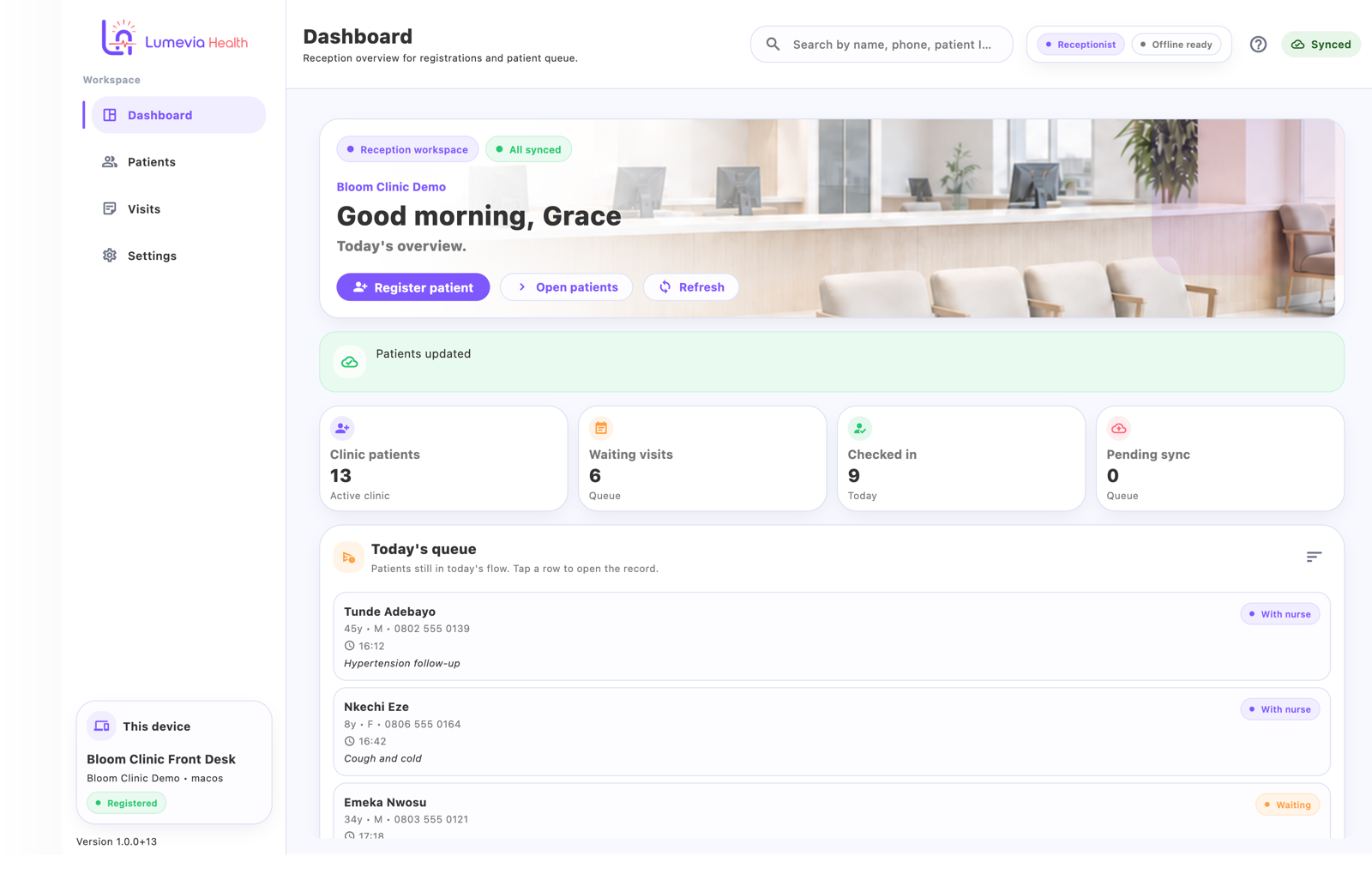
Reception
The day starts from one clear queue.
See visits, patient flow and sync status together, so the front desk knows what needs attention without opening several tools.
The outage story
Eleven seconds of a shift that did not stop.
When internet connectivity drops, registered devices keep patient work available. Changes remain encrypted on-device, then synchronise securely when the network returns.
- 00:00Connected
A normal shift
Reception is registering, nursing is capturing vitals, the consulting room is documenting. Nothing about the software is interesting yet.
- 00:03Unstable
The lights flicker
Power dips, the router restarts, the line drops. In a cloud-only tool this is where the desk stops moving.
- 00:04Offline · working
Offline · working
A small coral signal appears on every registered device. It is a status, not an error, and staff are told exactly what it means.
- 00:0518 queued
The queue grows
Registrations, vitals, notes, prescriptions and charges are encrypted on the device and counted into a visible local queue.
- 00:08Syncing
Connectivity returns
The device notices before anyone does and begins sending queued changes in order, over an encrypted channel.
- 00:10Synced
Queued items turn green
Each item is confirmed and marked synced. If something needs attention it stays visible instead of disappearing quietly.
- 00:11Shift continues
The team kept working
The outage is a line in a log, not a gap in the day's records.
00:00 — A normal shift
on device
Reception is registering, nursing is capturing vitals, the consulting room is documenting. Nothing about the software is interesting yet.
Devices and security
Control every device that can access your hospital records.
Lumevia combines encrypted local storage, role-based access and visible sync status so facility administrators stay in control of the EMR environment.
- Only registered devices
- A device must be registered to the facility workspace before it can hold records. An administrator can deactivate it to block future server access and sync.
- Encrypted on the device
- Local data and queued changes are encrypted at rest on the laptop or tablet, so a lost device is not an open filing cabinet.
- Encrypted in transit
- Synchronisation runs over an encrypted connection to the facility's own workspace, in order, with confirmation for each change.
- Role-based access
- Reception, nursing, clinicians, records and admin see what their duty requires. Access is granted per role, not per rumour.
- Separate facility workspaces
- Each hospital, clinic or group has its own tenant workspace. Records do not mix between facilities.
- Visible sync state
- Staff and administrators can see supported queue and sync states, with items needing attention kept visible rather than failing silently.
The six-week pilot
Move one hospital workflow at a time, with your team beside us.
Over six guided weeks, Lumevia configures your facility, trains each desk, migrates an agreed first batch of records and proves offline working before you decide what comes next.
- Week 101/06
Workspace and devices
Your facility workspace is created, staff roles are agreed, and the laptops and tablets that will hold records are registered.
- Week 202/06
Reception and registration
The front desk starts registering and checking in patients on device. Everything else stays on paper for now.
- Week 303/06
Nursing and consultation
Vitals and clinical notes join the same visit, so the consulting room stops waiting on slips.
- Week 404/06
Orders and billing
Prescription, investigation and billing workflows are configured within the agreed pilot scope.
- Week 505/06
Offline drill and migration batch
We deliberately work through an offline period, watch the queue and sync together, and convert an agreed batch of old folders.
- Week 606/06
Review and decision
Together we review what worked, what staff struggled with, and whether the facility continues, extends, or stops.
Starter pilot package
The primary way facilities begin with Lumevia.
One facility workspace, the registered devices your desks actually use, the patient record and visit workflow, and offline-first working with visible sync status — set up with you, desk by desk, over the six weeks above.
- Guided setup of your workspace, roles and registered devices
- Desk-by-desk rollout across the six weeks above
- A real offline drill, watched together
- An agreed first batch of old-folder migration
- A written review at week six before any commitment
- Your data exported at the end of the pilot, whatever you decide
Pricing
Published pricing, per facility.
One flat monthly price for the facility — not per seat, not per provider. The six-week pilot is a separate package, listed below the tiers so you can see exactly what each one covers.
- Starter
- $30/ facility / month
- Single-doctor clinic · up to 2 staff accounts
- Standard
- $50/ facility / month
- Small clinic with reception · up to 5 staff accounts
- Adds reception workflow, paper-record migration plan and onboarding
- Growth
- $75/ facility / month
- Multi-department clinic · up to 10 staff accounts
- Adds departmental workflows, billing and prescriptions, guided onboarding
- Hospital
- $150/ facility / month
- Full facility · unlimited, one facility staff accounts
- Adds extended training and priority support
| Plan | For | Per facility / month | Staff accounts |
|---|---|---|---|
| Starter | Single-doctor clinic | $30 | Up to 2 |
| StandardAdds reception workflow, paper-record migration plan and onboarding | Small clinic with reception | $50 | Up to 5 |
| GrowthAdds departmental workflows, billing and prescriptions, guided onboarding | Multi-department clinic | $75 | Up to 10 |
| HospitalAdds extended training and priority support | Full facility | $150 | Unlimited, one facility |
Every tier includes
- Patient records, visits and clinical notes
- Offline-first working on registered facility devices, with a visible sync queue
- Role-based access for the desks in scope
Before any tier
Starter Pilot Package: $50 per month.
The six-week pilot runs on its own package. It does not replace the tiers above, and it does not mean every facility pays $50 per month. If you choose to continue after the pilot, you select the published tier that matches your deployment.
Request a pilot- Duration
- Six weeks
- Scope
- One facility
- Devices
- Up to 5 registered devices
- Price
- $50 per month
The tiers above cover standard single-facility deployments. Non-standard, larger or multi-site deployments are quoted in writing.
Local billing in Naira is available for Nigerian facilities at the prevailing exchange rate.
A focused pilot. A platform built to expand.
Six weeks gives your facility a working outpatient pathway, a tested offline process and clear evidence for the next rollout decision.
6
guided weeks
One facility, one measurable workflow and one clear decision at the end.
- 01
A complete outpatient workflow
Registration, nursing, consultation, orders and billing move together on one patient record from the first desk to the last.
- 02
A practical migration path
Priority paper folders are converted in agreed batches, giving the facility a controlled path from archive to active digital records.
- 03
Resilience tested with your team
The pilot includes a live offline drill so staff can see the workflow continue on registered devices and synchronise when connectivity returns.
- 04
Room to expand
Pharmacy dispensing and full laboratory queue management are available on higher tiers, with the next rollout scope agreed around your facility.
FAQ
The questions hospital owners ask first.
What is an offline-first EMR?
An offline-first electronic medical record system keeps supported patient workflows available on registered facility devices during internet interruptions. With Lumevia, registration, vitals, consultations, orders and billing continue locally, and queued changes synchronise when connectivity returns.
What happens to changes made while the clinic was offline?
They are held in a visible synchronisation queue with the time they were actually made. When the network returns they are sent in order over an encrypted connection. An item that fails stays in the queue rather than disappearing.
Where is patient data stored?
In an encrypted database on the facility's own registered devices. A device must be registered before it can hold or sync records, and registrations are reviewable and removable from the admin screens.
What does the pilot cost?
The Starter Pilot Package is $50 per month for the six-week pilot at one facility, covering up to 5 registered devices, with no per-seat charge. If you choose to continue after the pilot, you select the published tier that matches your deployment: Starter $30, Standard $50, Growth $75 or Hospital $150 per facility per month. Local billing in Naira is available at the prevailing exchange rate.
Which parts of the hospital does the pilot cover?
One outpatient pathway: reception, nursing, the consulting room, orders and billing. Pharmacy dispensing, full laboratory queue management and inpatient wards are outside the six-week scope.
Can we get our data out?
Yes. Your data is exported to you at the end of the pilot whether or not you continue.
Can we download the app now?
Not publicly yet. Builds are delivered to onboarded pilot facilities, and the download page shows each platform's real status. A build only becomes downloadable there once its file and checksum exist.
Request a pilot
Tell us about the facility.
We reply with a proposed starting pathway, a week-one plan, and the device and migration requirements for your facility.
- What we need from you
- A contact person, your desks and rough patient volume.
- What you get back
- A scoped six-week plan, device checklist and pricing.
- Timeline
- Onboarding is scheduled once devices and roles are confirmed.
- Please note
- Do not include patient information in this form.
Prefer email? admin@lumevia.health

The shift never stops
Neither should your records.
Start with one facility and prove an EMR workflow that keeps moving through a real connectivity outage.